



Ever feel sick to your stomach when you have to ask a client for a favor? Asking for reviews can feel similar. You know you did a good job, but you shouldn’t seem desperate or annoying. This is normal for every business owner, but handling it is crucial for growth.
The truth is, most happy customers reviews are willing to leave, they just don’t remember or find the process complicated. If you make it easy for them, they’ll often happily oblige.
Getting regular reviews is very important for your business. This builds trust with new visitors, signals to search engines that you’re active, and also provides honest feedback. In this post, I’ll share the strategies that help me get satisfied customers to leave reviews for you and become your advocates.
Want to stay ahead with AI-driven WordPress insights and stay updated with the latest trends? Subscribe for daily search insights at wpguidepro to improve your WordPress strategy
Table of Contents
Quick Answer: How to Get More Customer Reviews
The secret to getting more reviews is timing and a simple process. When the customer is most happy like immediately after a purchase or after a problem is resolved with support ask them for a review. And make the process easy.
Don’t make them click through five different pages. Send a direct link, use a QR code, or show the form right where it is. When you make the process easy, reviews will start coming automatically.
Why Do Customer Reviews Matter?
Social proof is the currency of the digital age. Before buying something, most people look at reviews to confirm their decision. When they see that others are happy, they feel less risky trying something new.
Reviews not only build trust, they are also very powerful for SEO. Search engines love fresh, user-generated content. When customers provide detailed feedback, they naturally use keywords related to your business, which helps you rank in search results.
If you have more positive reviews, Google considers you authoritative, which can improve local search rankings.
How to Create a Customer Review Form in WordPress
If you’re running a WordPress site, you don’t need expensive software to collect feedback. You can easily create review forms using plugins like WPForms or Gravity Forms.
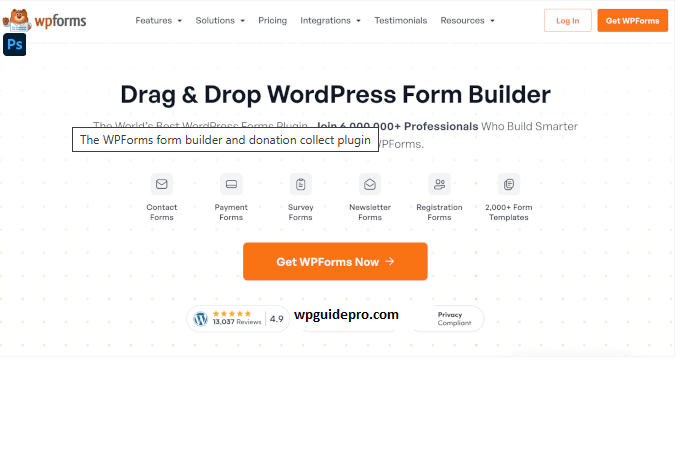
These plugins create simple forms where customers can enter their name, stars, and comments. After creating the form, you can add it to a Leave a Review page or a Thank You page. Having a form on your site gives you control over the data and allows you to verify reviews before displaying them.
12 Proven Tips to Get More Customer Reviews
Here are some simple ways I use to get regular feedback:
Ask immediately after a purchase or project is complete.
Timing is very important. Customers are most excited when they’ve purchased something or you’ve completed a task for them. Send a review request on the order confirmation page right then.
Ask for a review after positive support.
If a customer reported a problem and your team resolved it immediately, they’re now happy and grateful. This is the perfect moment to ask: So glad we solved it! Can you leave a quick review?
Gentle follow-up after 3-5 days
People are busy and might ignore the first request. Send a short and friendly email after 3-5 days to remind them.
Add a review section to customer accounts
If your website has user profiles or a dashboard, add a Rate Us button or review section there. When customers log in, the review option is easily accessible.
Add links to email signatures and order receipts
Receipts, shipping emails, and password resets have high open rates. Add a subtle link to the footer or signature: Happy with our service? Leave a review!
Use QR codes
QR codes are very helpful for physical products or stores. Print QR codes on packaging, business cards, or the checkout sign that lead directly to a Google Review or feedback form.
Display reviews prominently on the website
When visitors see that others have left reviews, they consider it normal to do so as well. Showcase the best reviews on the homepage, landing pages, and checkout pages.
Use on-site popups
Use tools like OptinMonster to create popups that display after a purchase or when visiting specific pages. Target only the right customers.
Offer incentives
You can offer a small incentive for a customer time, such as a discount, loyalty points, or a giveaway entry. Note: Be careful on third-party sites like Google/Yelp. This works best for your website.
Encourage reviews on social media
Followers are already engaged. Create posts and ask for feedback, such as What’s your favorite way to use the product? and feature their answers with permission.
Collect video testimonials
Written reviews are great, but video is more credible. Ask loyal customers for 30-second video clips. Make it easy for them by sending three simple questions.
Track and improve review strategy
You can’t improve what you don’t measure. See which emails or touchpoints are driving the most reviews. If there is low conversion, tweak the subject line or call-to-action. Continuous testing improves the strategy.
Common Mistakes to Avoid When Asking For a Review
It’s good to be persistent, but there’s a fine line between being helpful and annoying.
Avoid these mistakes:
- Don’t be too pushy: If you don’t get a reply after one follow-up, give up.
- Don’t buy fake reviews: This destroys your credibility and can get you banned from search engines.
- Don’t complicate the process: If you have to create an account to leave a review, people won’t.
- Don’t ignore bad reviews: Showing only 5-star reviews can look suspicious. A mix of reviews appears more authentic.
How to Handle Negative Reviews Gracefully
Sometimes you’ll receive a negative review. This happens even to the best businesses. The most important thing is not to panic or get defensive.
- Reply quickly and professionally.
- Understand the customer’s frustration and apologize for the specific issue.
- Offer to continue the conversation offline so the problem can be resolved.
New customers often look more at how you handle issues than the issues themselves. Polite and constructive replies build more trust than a sometimes perfect record.
Frequently Asked Questions About Collecting Customer Reviews
Which platform is best for collecting reviews?
It depends on your business. Google Reviews is best for local businesses because they improve local SEO. For e-commerce, product page reviews are important because they increase sales.
Is it illegal to delete negative reviews?
You can moderate reviews on your website, but deleting only negative reviews is unethical and misleading. On third-party sites like Google or Yelp, reviews are only deleted if they break the platform’s rules (such as hate speech or spam).
How often should you request reviews?
Request one after every transaction or project completion. You can send a reminder, but don’t disturb the same customer repeatedly.